



TL;DR: With emulation software, Nintendo Switch games can be played on PCs. As of 2026, a significant amount of the Switch library is supported with strong compatibility by the most popular emulators, Suyu and Ryujinx forks. Your hardware has a significant impact on performance, and downloading ROMs for games you don’t own puts you at serious legal risk in the majority of jurisdictions. One of the most cherished game libraries in contemporary gaming history was created by Nintendo’s hybrid system.
The Switch catalog speaks for itself, from Mario Kart 8 Deluxe’s frantic fun to The Legend of Zelda: Tears of the Kingdom’s expansive open-world. What happens, though, if you want to play those games at higher frame rates, on a larger screen, or at resolutions that the Switch hardware just cannot provide? That’s precisely what Switch emulation enables. Over the past few years, the scene has developed significantly; compatibility and stability will reach a true peak in 2026. On mid-range PCs, games that previously performed poorly or crashed out completely now run smoothly and frequently outperform the original hardware.
Everything you need to know is covered in this guide, including what Switch emulation is, what emulators are available, how well popular games work, what hardware you’ll need, and the legal issues you should be aware of before downloading anything. This is the most up-to-date explanation available, regardless of your level of experience with emulation.
What Is Nintendo Switch Emulation?
Emulation refers to the process of transferring the behavior of one computer system to another computer system. A Nintendo Switch emulator is a piece of software that replicates the Nvidia Tegra X1 processor, operating system, and input systems of the Nintendo Switch. This allows Switch game files to be played on traditional personal computer hardware.
Since the Switch was released in 2017, significant emulation efforts have been underway almost immediately after its release. In the beginning, there were significant performance gaps and very little compatibility to begin with. By the beginning of the 2020s, the rate of advancement had undergone a significant acceleration. There are now a variety of games that, when played on capable personal computer hardware, operate at or above their native performance level. Switch emulators do not have the capability to read cartridges directly.
In its place, they load game files that are referred to as dumps or ROMs. These files are digital replicas of the game data that are taken from either physical or digital products. When it comes to the origins of those files, the legal situation becomes more complicated; this topic will be covered in greater detail later on in this guide. For those interested in exploring the wider world of Nintendo ROMs, Roomsgames is an excellent place to visit the Nintendo ROMs Games section.
There are a great number of platforms and titles that can be found on the internet that are worth investigating.
Which Emulators Are Used to Play Nintendo Switch Games on PC?
Two projects dominate the Switch emulation landscape in 2026, though both have gone through significant upheaval following Nintendo’s legal actions in 2024.
Ryujinx
An open-source C# Nintendo Switch emulator called Ryujinx (pronounced “ryu-ji-nks”) was first created by a contributor by the name of gdkchan. Because of its accuracy and stability—games typically behave more like they would on actual Switch hardware—the project attracted a sizable community. Both Vulkan and OpenGL rendering backends are supported by Ryujinx.
The Vulkan backend is typically advised since it performs better on the majority of contemporary GPUs. Additionally, the emulator offers strong support for save file management and multiplayer features.
Important note: As a result of a legal agreement with Nintendo, the initial development of Ryujinx was halted in October of 2024. Despite this, the community forks of the project have continued to develop on their own and independently. As of the year 2026, representatives from the emulation community continue to make use of and actively maintain a number of successor forks.
Suyu
A community fork of Yuzu, Suyu was shut down in March 2024 following a lawsuit filed by Nintendo alleging violations of the Digital Millennium Copyright Act (DMCA). Before it was discontinued, Yuzu supported thousands of games and was the most widely used Switch emulator for many years. Suyu continued development in a decentralized fashion while preserving a large portion of the original codebase, carrying on where Yuzu left off. Its compatibility profile, which covers a sizable portion of the Switch library with varying degrees of playability across various titles, largely resembles that of late-era Yuzu. Other Emulators Worth Knowing
Citron is another Yuzu-derived fork that has attracted attention for performance-focused optimizations, particularly for graphically demanding games. Torzu is a more lightweight option, sometimes preferred for users running lower-end hardware.
Suyu and Ryujinx community forks are the most reliable starting points for the majority of users in 2026. Which emulator works best will often depend on the particular game you want to play; it’s always worthwhile to check community compatibility databases before committing to a setup.
Compatibility Overview: Which Switch Games Run Well on PC?
The hardware being used, the emulator version, and the game all affect compatibility. Nevertheless, the majority of the Switch catalog has a generally positive outlook for 2026.
Well-Supported Titles
Many first-party Nintendo titles run with strong compatibility across both major emulators. Games frequently reported as running well include:
- The Legend of Zelda: Breath of the Wild and Tears of the Kingdom
- Super Mario Odyssey
- Mario Kart 8 Deluxe
- Metroid Dread
- Fire Emblem: Three Houses
- Xenoblade Chronicles 3
- Pokémon Scarlet and Violet (with some graphical quirks on certain configurations)
Additionally, third-party games are performing well. Thanks to the extra headroom of PC hardware, games like Hades, Hollow Knight, Stardew Valley, and Ori and the Will of the Wisps run consistently—often better than their native Switch versions.
Titles With Known Issues
Some graphically demanding or heavily encrypted titles still pose challenges. Pokémon Scarlet and Violet compatibility has seen some big improvements but graphical glitches and frame rate instability are still present on some configurations.
Newer releases, especially those released in late 2024 and beyond, may have less support depending on how quickly emulator developers are able to keep up with firmware and game updates. In most cases, emulation does not support online multiplayer features. Local multiplayer over LAN via things like Tailscale are working in some cases but features of Nintendo Online are not supported.
What Performance Can You Expect From Switch Emulation in 2026?
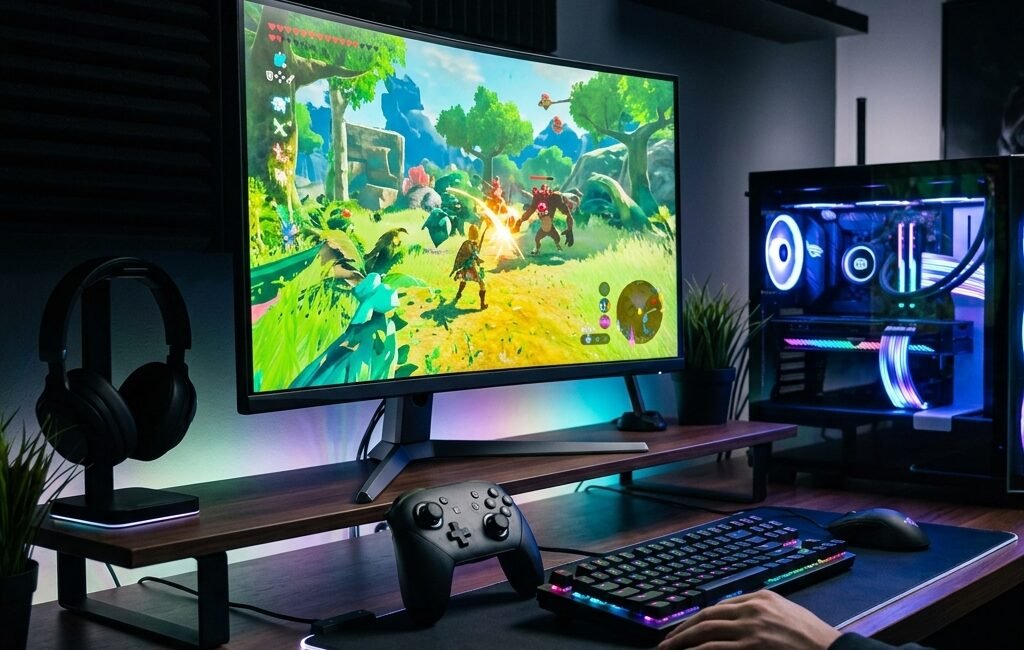
Performance has improved a lot over the past few years with better support for GPU drivers, wider adoption of Vulkan and increasingly optimized emulator code. Most well-supported titles will run at a stable 60 fps at 1080p on modern mid-range hardware like an Intel Core i5 or AMD Ryzen 5 paired with an Nvidia RTX 3060 or AMD RX 6600.
Others are modding games, upscaling them to 4K resolutions, and producing visuals far beyond what the Switch hardware can natively put out. Performance of switch emulation depends heavily on the CPU.
Ryujinx and Suyu are both very CPU intensive applications and it’s the strong single core clock speed that matters more than raw core count. Both AMD’s Ryzen 7000-series and Intel’s 13th and 14th gen chips do well here. Stuttering due to shader compilation has long plagued Switch emulation, and while precompiled shader cache systems have helped, it is not yet solved. expect some stuttering on demanding titles for a first play session.
When the shader cache is accumulated, later sessions tend to run more smoothly. What Are the PC System Requirements for Running Switch Emulators?
The following specs represent general guidance for running Switch emulators in 2026. Individual titles may require more or less depending on their complexity.
Minimum (basic compatibility, lower settings):
- CPU: AMD Ryzen 5 3600 or Intel Core i5-10600K
- GPU: Nvidia GTX 1660 Super or AMD RX 5700
- RAM: 16 GB DDR4
- Storage: SSD strongly recommended
- OS: Windows 10 64-bit or Linux
Recommended (stable 60 fps at 1080p for most titles):
- CPU: AMD Ryzen 7 5800X or Intel Core i7-12700K
- GPU: Nvidia RTX 3070 or AMD RX 6700 XT
- RAM: 16–32 GB DDR4
- Storage: NVMe SSD
Linux users should note that both major emulators have native Linux builds available, and Vulkan support on Linux has reached the point where performance is competitive with Windows in most configurations.
What Are the Legal Considerations Around Nintendo Switch ROMs?
This section covers ground that many users prefer to skip—but understanding the legal landscape is genuinely important before proceeding.
Emulation software itself is generally legal. US courts have ruled that, so long as the emulator was developed independently and does not contain any proprietary firmware code, emulators do not infringe on copyright. Nintendo’s 2024 lawsuits against Yuzu and Ryujinx focused primarily on DMCA arguments—namely, the alleged circumvention of Nintendo’s encryption—rather than emulation per se.
Nintendo Switch game ROMs are a different matter. In most jurisdictions, downloading a ROM of a game you do not own is considered copyright infringement. Nintendo has gone after sites that host ROMs with aggression, and has managed to take down several big repositories.
The argument that it is legal to dump your own cartridge is true in some extent in some legal systems, but the process is technically complex and the legality varies by country.
Firmware and encryption keys add another layer of complexity. Extracting these from your own Switch console is technically permissible in some regions under certain interpretations of the law, but distributing them is not. Many emulators require these keys to run commercial game titles.
The short version: proceed with a clear understanding of the rules in your jurisdiction. Emulation works best as a way to access games you legally own, not as a workaround for purchasing them.
For broader context on how ROMs intersect with gaming history and preservation, the ROMs Games section on Roomsgames.online explores a range of titles across different platforms.
The Bottom Line on Switch Emulation for PC in 2026
SIt is difficult to imagine that five years ago PC emulation of witches was so immature. A huge library of titles plays well, performance is solid on modern hardware, and the community is still pushing compatibility forward despite the legal turbulence of 2024.
It’s not going to be perfect for every game. Newer releases, complex open-world titles and anything that relies on Nintendo’s online infrastructure will still have rough edges. But for much of the Switch catalog, PC emulation in 2026 is not only possible—it often makes for a better experience than original hardware, especially on high-resolution displays.
If you’re ready to begin, choose a well-supported title from community compatibility lists, buy an NVMe SSD for fast load times, and spend some time setting up your Vulkan backend. The setup curve is steeper than booting a console, but the payoff on a quality monitor is worth it.
Curious about what else the Nintendo ROM ecosystem looks like beyond the Switch? Explore titles like Mario’s Game Gallery or check out the Hasbro Family Game Night Fun Pack for Wii for a look at how earlier Nintendo-adjacent platforms hold up today.
Frequently Asked Questions
Can Nintendo Switch games run on PC without an emulator?
No. Switch games are compiled for the Switch’s ARM-based Tegra X1 architecture and can’t be run natively on standard x86 PC hardware. To do this, an emulator must be used to translate the game’s instructions into a form that the PC processor can execute.
What happened to Yuzu and Ryujinx?
The service was shut down after Nintendo filed a DMCA lawsuit against Yuzu for circumventing encryption in March 2024. Its developers relented, agreeing to pay $2.4 million in damages and abandoning the project. The original developer of Ryujinx also killed the project under similar legal pressure in October 2024. Since then, both projects have continued to evolve separately in community forks.
Is it legal to download Nintendo Switch game ROMs for PC if I already own the game?
The legal status is unclear and varies from country to country . Some legal arguments would support the right to make personal backup copies of media you own, but it is prohibited by Nintendo’s Terms of Service and the DMCA adds more complexity. In practice, downloading ROMs from third-party sites is always a legal risk, regardless of whether or not you own the game.
Which is better for playing Nintendo Switch games on PC—Ryujinx or Suyu?
Each one has its own strength. Ryujinx forks tend to have better accuracy and stability across a wide range of titles. Suyu and other Yuzu forks often offer a bit more raw performance for demanding games. Your best option depends on the particular title – the best way to make a decision is to check community compatibility databases for your target game.
Do I need a high-end PC to run Switch games through emulation?
Most titles at 1080p/60fps will be fine with a mid-range PC from 3-4 years ago. Demanding open world games like Tears of the Kingdom require higher end hardware. The single core cpu performance and a vulcan capable gpu are the top two things that will affect switch emulation performance the most.
Can I use a Nintendo Switch controller with PC emulation software?
“Yes. Ryujinx & Suyu also recognize Nintendo Switch Pro Controllers and Joy-Cons through Bluetooth or USB. Standard Xbox controllers and most other PC gamepads also work out of the box without any additional configuration.
Where can I find compatibility information for specific Switch games?
There are public compatibility databases for both the emulation communities of Ryujinx and Suyu. These are updated regularly and the titles are grouped by playability status. This is a good place to start when setting up a new game.

Other Articles
[…] game premiered on February 23, 2010 in North America on Xbox 360, PlayStation 3, Wii, Nintendo DS, and PC simultaneously. The game was then ported to iOS and later as a standalone arcade […]
thanks